تفصیل
यह प्लगइन एक कस्टम हॉरिजॉन्टल स्क्रॉलिंग बटन सॉल्यूशन है जिसे विशेष रूप से उपयोग में आसानी के लिए डिज़ाइन किया गया है। यह वर्डप्रेस डैशबोर्ड में एक समर्पित सेटिंग्स पेज जोड़ता है जिससे उपयोगकर्ता बिना किसी कोड को छुए बटन के नाम और लिंक को प्रबंधित कर सकते हैं।
मुख्य विशेषताएँ (Main Features):
* प्रशासनिक पैनल (Admin Panel): सेटिंग्स को प्रबंधित करने के लिए एक साधारण डैशबोर्ड पेज।
* प्रदर्शन (Performance): फ़ॉर्म सबमिशन के लिए वर्डप्रेस के admin-post एपीआई का उपयोग करता है।
* निर्भरता (Dependencies): यह प्लगइन पूरी तरह से स्टैंडअलोन है और इसे किसी भी बाहरी लाइब्रेरी की आवश्यकता नहीं है।
* उपयोग में आसान (Easy to Use): बटनों को प्रदर्शित करने के लिए शॉर्टकोड [my_b21_cards] का उपयोग करें।
سکرین شاٹاں

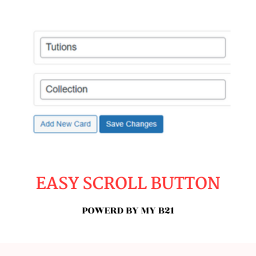
यह प्लगइन का मुख्य सेटिंग्स पेज है, जहाँ आप बटन जोड़ सकते हैं। 
यहाँ दिखाया गया है कि स्क्रॉलिंग बटन वेबसाइट पर कैसा दिखेगा।
انسٹال کرݨ
- Upload the
custom-scrollable-button-my-b21-cardsfolder to the/wp-content/plugins/directory. - Activate the plugin through the ‘Plugins’ menu in WordPress.
- Go to the “My B21 Cards” settings page in your WordPress admin dashboard to add and manage your buttons.
- Use the shortcode
[my_b21_cards]in your posts, pages, or widgets to display the buttons.
ہرہک دے سوال
-
You can display the buttons by using the shortcode
[my_b21_cards]in any post, page, or widget area. -
After activating the plugin, you will find a new menu item in your WordPress admin dashboard called “My B21 Cards”. All settings are located there.

Contributors & Developers
“Custom Scrollable Button – My B21 Cards” is open source software. The following people have contributed to this plugin.
حصہ پاوݨ آلے
“Custom Scrollable Button – My B21 Cards” دا آپݨی زبان وچ ترجمہ کرو۔
ڈیویلپمنٹ وچ دلچسپی ہے؟
Browse the code, check out the SVN repository, or subscribe to the development log by RSS.
تبدیلی لاگ
2.9.3
- Moved the donation box to the top of the settings page for better visibility.
- Fixed a code display issue on the settings page.
2.9.2
- Added a donation link to the WordPress.org plugin page.
- Added a donation box in the plugin settings page for user support.
2.9.1
- Fixed a critical bug where the admin settings page was not functional due to a missing admin-script.js file.
- Added admin-script.js to handle admin page interactivity.
2.9
- Fixed security vulnerabilities as per WordPress team feedback. [cite: 17]
- Moved admin JavaScript to a separate file. [cite: 17]
- Improved sanitization and nonce verification. [cite: 18]