
تفصیل
Kaya QR Code Generator lets you create and display QR codes in your WordPress content using shortcodes, the built-in Gutenberg block or widget.
No external service, API or third-party dependency is required. The QR code generation library is included with the plugin.
You can encode any text, URL or other content, including Bitcoin addresses or the URL of the current page.
The QR code can be customized with different options such as size, error correction level, colors, alignment, title, alternative text, clickable links and a download button.
Three ways to add a QR code
- Shortcode – Add a QR code using the
[kaya_qrcode]shortcode or the dynamic[kaya_qrcode_dynamic]shortcode. - Gutenberg block – Add and configure a QR code directly in the WordPress block editor.
- Widget – Add a QR code to a widget area using the built-in widget.
Shortcode generator
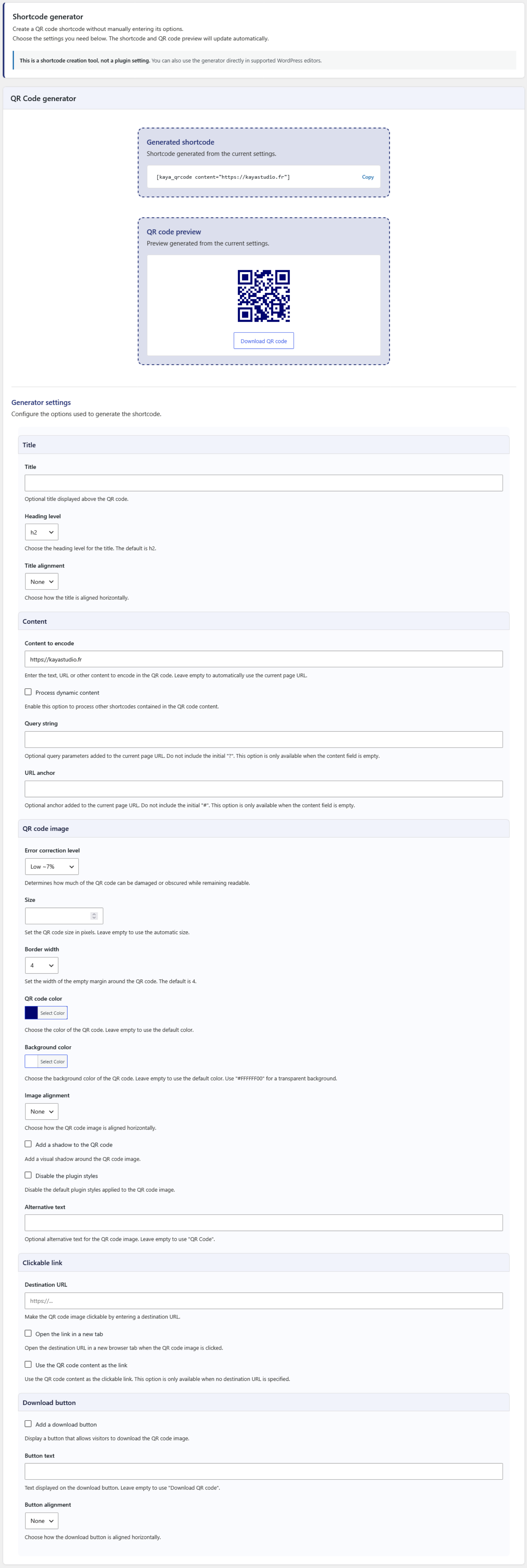
The built-in Shortcode generator helps you create a shortcode without having to remember or enter its options manually.
The generator provides a live QR code preview and generated shortcode that can be copied and inserted into your content.
It is available:
- On the plugin settings page.
- In the editor meta box for supported post types.
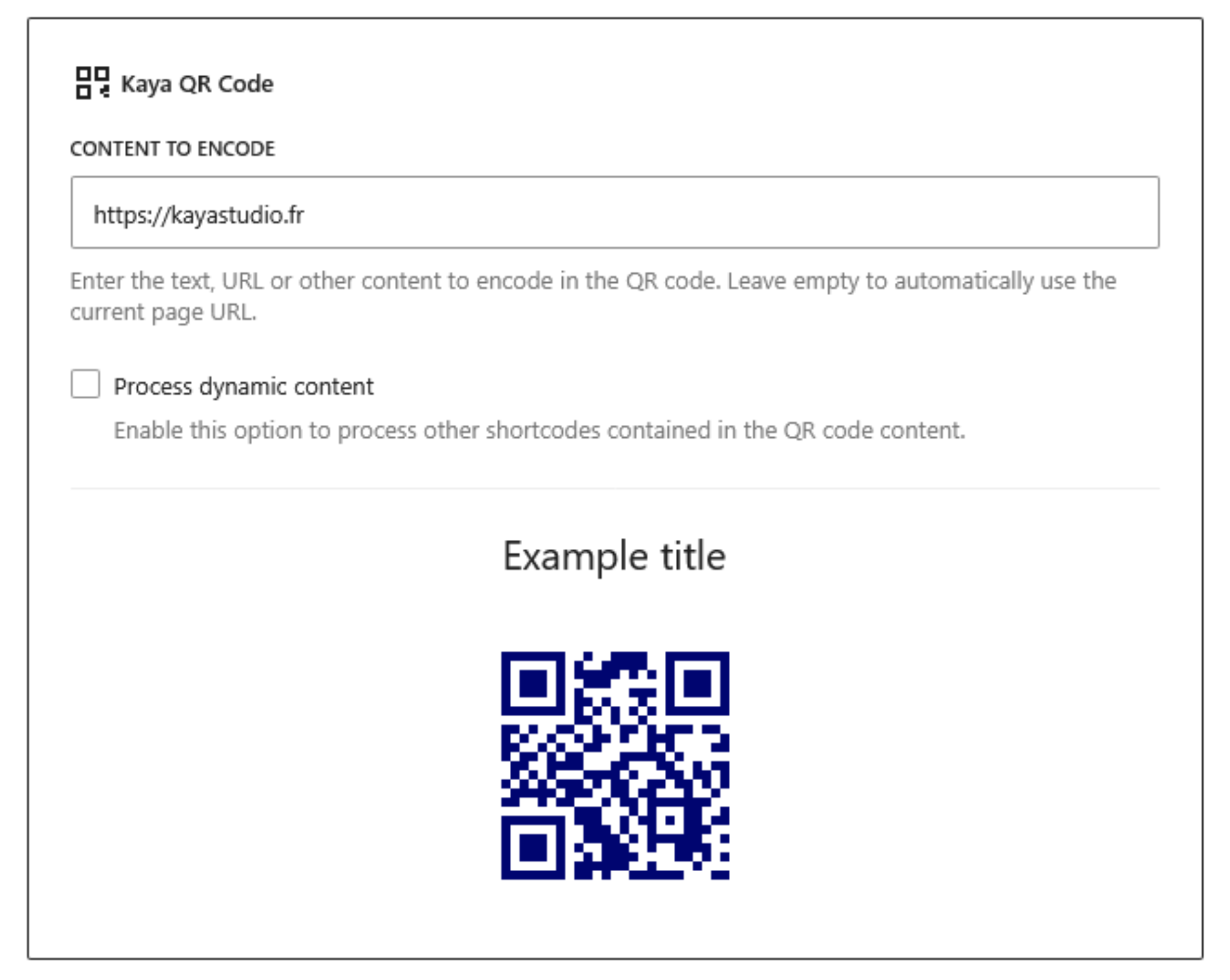
The generator can also be configured to be displayed collapsed by default in the editor, showing only the generated shortcode and QR code preview until the full generator is opened.
QR code features
- Add an optional title and choose its heading level and horizontal alignment.
- Encode static or dynamic content.
- Automatically use the current page URL when no content is specified.
- Add a query string to the automatic current page URL.
- Add an anchor to the automatic current page URL.
- Select the error correction level.
- Set the QR code image size.
- Set the QR code border width.
- Customize the QR code and background colors.
- Align the QR code image horizontally.
- Add a shadow to the QR code image.
- Disable the default plugin styles.
- Set custom alternative text for the QR code image.
- Add a clickable link to the QR code image.
- Support non-standard URL schemes for clickable links.
- Open clickable links in a new browser tab.
- Add a download button with custom text and alignment.
Error correction levels
The QR code supports four error correction levels:
- Low – Approximately 7% of the codewords can be restored.
- Medium – Approximately 15% of the codewords can be restored.
- Quartile – Approximately 25% of the codewords can be restored.
- High – Approximately 30% of the codewords can be restored.
Higher error correction levels make the QR code more resistant to damage or obstruction, but require more space within the QR code.
Dynamic content
Dynamic content allows the QR code content to be generated by another WordPress shortcode.
For example:
[kaya_qrcode_dynamic][example_shortcode][/kaya_qrcode_dynamic]
The shortcode contained between the opening and closing tags is processed before the QR code is generated.
Settings
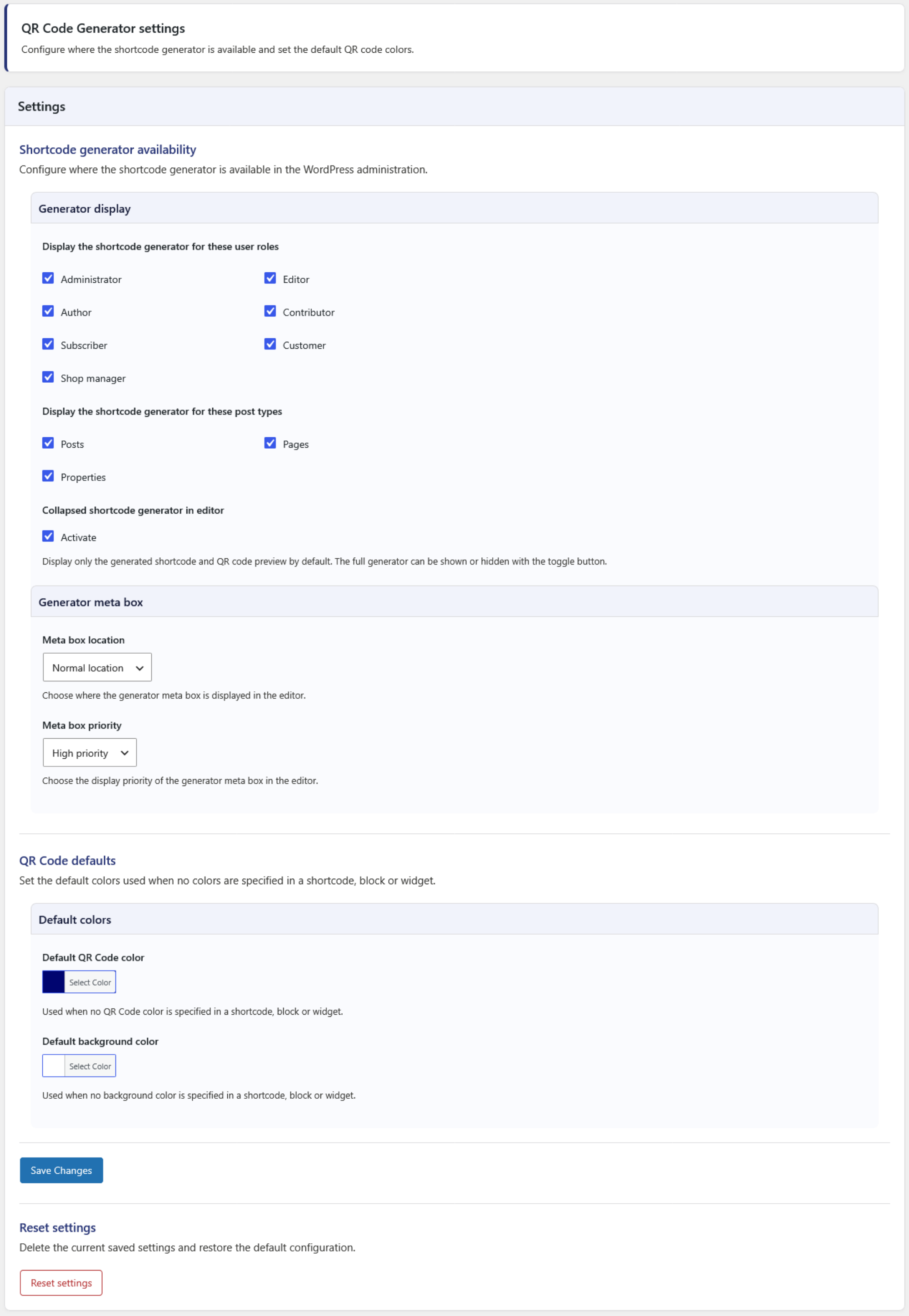
The plugin settings allow you to configure:
- Which user roles can access the Shortcode generator.
- Which post types display the Shortcode generator.
- Whether the generator is collapsed by default in the editor.
- The meta box location and priority in the editor.
- The default QR code color.
- The default background color.
The plugin is compatible with WordPress Multisite and WooCommerce.
Basic shortcode examples
Static content:
[kaya_qrcode content="https://example.com"]
If no content is specified, the URL of the current page is used automatically:
[kaya_qrcode]
Dynamic content:
[kaya_qrcode_dynamic][example_shortcode][/kaya_qrcode_dynamic]
Additional options can be added to either shortcode.
Privacy
Kaya QR Code Generator does not collect or send personal user data to the plugin author or any third-party service.
The plugin does not set cookies and does not connect to external services.
QR codes are generated from the content and settings provided by the user.
Available Languages
- English.
- French.
Feedback
Suggestions and feedback are welcome.
If you use Kaya QR Code Generator, please consider sharing your experience and rating the plugin. Your feedback helps improve the plugin and makes it easier for other users to discover it.
سکرین شاٹاں

Blocks
This plugin provides 1 block.
- Kaya QR Code Add a QR Code to your content.
انسٹال کرݨ
The quickest way:
- Go to Plugins > Add New in WordPress.
- Search for Kaya QR Code Generator.
- Click Install Now and then Activate.
The other way:
- Upload the
kaya-qr-code-generatorfolder to the/wp-content/plugins/directory. - Activate the plugin through the Plugins menu in WordPress.
ہرہک دے سوال
-
How can I add a QR code to my content?
-
There are three ways to add a QR code:
- Use the
[kaya_qrcode]shortcode. - Add the Kaya QR Code block in the Gutenberg editor.
- Use the Kaya QR Code widget in a widget area.
You can also use the Shortcode generator to create a shortcode with your preferred options.
- Use the
-
How do I use the Shortcode generator?
-
The Shortcode generator lets you configure the QR code options and automatically generates the corresponding shortcode.
It also provides a QR code preview and a button to copy the generated shortcode.
In the editor, the generator can be displayed fully or collapsed by default. When collapsed, only the generated shortcode and QR code preview are displayed until the generator is opened.
-
Why are my changes in the editor not saved with the post?
-
The Shortcode generator fields are used to build a shortcode. They are not custom fields for the post and do not modify or save anything in the post content.
After configuring the QR code, copy the generated shortcode and insert it into a Shortcode block or directly into your content.
If you want to configure and insert a QR code directly in the Gutenberg editor, you can use the Kaya QR Code block instead.
-
How can I use dynamic content?
-
Dynamic content allows you to generate the QR code content from another WordPress shortcode.
For a shortcode, use:
[kaya_qrcode_dynamic][example_shortcode][/kaya_qrcode_dynamic]The shortcode between the opening and closing tags is processed before the QR code is generated.
-
Can I use the current page URL automatically?
-
Yes.
Use:
[kaya_qrcode]When no content is specified, the URL of the current page is used automatically.
You can also add a query string or an anchor to the current page URL.
-
Can I customize the QR code appearance?
-
Yes.
You can customize the QR code size, border width, error correction level, colors, background color and alignment.
You can also add a title, shadow, alternative text, clickable link and download button.
-
Can I make the QR code clickable?
-
Yes.
You can specify a destination URL for the QR code image or use the QR code content as the link.
The link can also be configured to open in a new browser tab.
Non-standard URL schemes are supported.
-
Can I use a transparent background?
-
Yes.
The background color supports transparency. You can use an 8-digit hexadecimal color value such as
#FFFFFF00for a fully transparent background. -
Can I use the generated QR code outside WordPress?
-
Yes.
The QR code image generated by the plugin can be downloaded and then used wherever you need it.
However, the shortcode itself is intended to be used in WordPress content and cannot be used directly in a PDF or email.
-
Does the plugin use an external QR code service?
-
No.
The QR code generation library is included with the plugin (based on qr.js written by Kang Seonghoon). No external API, service or third-party application is required to generate the QR code.
-
Is my data sent to a third-party service?
-
No.
The plugin does not connect to third-party services or applications to generate QR codes. The QR code is generated from the content provided to the plugin.
-
Is the plugin compatible with WooCommerce?
-
Yes.
The Shortcode generator can be made available for WooCommerce products, and QR codes can be used in WooCommerce content like other WordPress content.
-
Is the plugin compatible with WordPress Multisite?
-
Yes.
Kaya QR Code Generator supports WordPress Multisite.
-
How can I support the development of the plugin?
-
Kaya QR Code Generator is free to use and is developed by Kaya Studio.
You can support the development by leaving a review, sharing the plugin or making a donation.
More information about donations is available here: https://dotkaya.org/a-propos/
ریویو


Contributors & Developers
“Kaya QR Code Generator” is open source software. The following people have contributed to this plugin.
حصہ پاوݨ آلے
“Kaya QR Code Generator” has been translated into 6 locales. Thank you to the translators for their contributions.
“Kaya QR Code Generator” دا آپݨی زبان وچ ترجمہ کرو۔
ڈیویلپمنٹ وچ دلچسپی ہے؟
Browse the code, check out the SVN repository, or subscribe to the development log by RSS.
تبدیلی لاگ
1.7.0
- Added: Built-in Gutenberg block for adding and configuring QR codes directly in the block editor.
- Added: QR code preview in the Gutenberg block.
- Added: Generated shortcode copy button.
- Improved: Plugin administration interface and user experience.
- Improved: Settings and Shortcode generator interface.
- Improved: Settings and generator descriptions.
- Improved: Documentation and user interface consistency.
1.6.0
- Fixed: Proper query string added to the automatic current page URL if parameters are already present.
- Added: Option to remove the default plugin styles from the QR code image.
- Added: Option to select the QR code border width.
- Added: Option to display a download button on the frontend with custom text and alignment.
- Added: Settings to select the meta box context and priority in the editor.
- Added: Settings to select the default QR code image color and background color.
To read the changelog of earlier versions of Kaya QR Code Generator, please see the changelog.txt file.