
تفصیل
EngageBay’s Free Live Chat plugin is a live chat service which allows your on-site visitors and customers to communicate with you easily straight from your website. Take customer service experience to the next level with our free live chat software! It is designed specifically for the WordPress community. Boost customer service and grow sales instantly.
With the EngageBay live chat plugin for WordPress, you can quickly and easily add live chat support to your WordPress website. It allows for instant communication with on-site visitors and customers and enables prompt resolution to their questions or concerns.
With a fully functional WordPress live chat plugin, boost your sales and build stronger customer relationships.
This WordPress support chat plugin will help you deliver the personalised one-on-one live support to every customer.
It is absolutely free
EngageBay live chat plugin is a pleasure to use. With emojis, file attachments and shortcuts, it’s really awesome
Brian – WordPress Consultant
EngageBay live chat is the best WordPress live chat plugin available in the market.
Here’s why smart business owners, and their customers love us, and you will too!
How EngageBay Live Chat Can Add Value To Your Business
- Talk to your customers in real-time.
- Track the entire customer journey.
- Send proactive message to invite your customers to a live chat.
- Gain deep insights within chat transcripts.
- Increase trust and brand value of your business.
- Have all the customer information available for your agent right in the chat window.
- Use customer feedback after each chat to measure their experience, agent performance.
- Collaborate as a team for quick solutions.
- Measure every data point, run reports and get metrics to boost customer satisfaction.
- Upcoming chatbot will engage visitors automatically.
Key Features of EngageBay Live Chat:
- Install the live chat widget on as many websites and blogs as you want at no additional cost.
- Customize the chat widget completely to suit your website. Mix and match from a range of colors and options.
- Save time by creating shortcuts for common answers and replies. Access these shorts with a click of a button in the chat sessions.
- Transfer chats to other agents in a single click. Work as a team to delight customers.
- Follow visitors as they browse through your website, providing a seamless chat experience.
- Email the chat transcript to the customer for reference as soon as the agent is done with the chat.
Talk to your customers in real-time
Give your customers an easy, fast, and effective way to interact with your support agents to get their queries answered and issues resolved. Ensure enhanced customer service experiences and build meaningful and long lasting relationships by communicating with your customers over live chat.
Track the entire customer journey
View all customer information in a single window – manage and reach out from one place. Get complete visibility of your customer behavior using EngageBay LiveChat and personalize your approach. Track your customer’s location and journey on your website (Current page, pages visited, time spent, etc.). Receive emails when visitors initiate a chat but your support agents or sales agents are unavailable to chat.
Offer support proactively
Send a message to invite your customers by initiating a live chat. Show them that you care by offering support proactively. Automate and customize the chat message based on several factors like the page the visitor is browsing, their location, referral website, whether they are a new or returning visitor and many more. Automate the chat invitations easily with EngageBay.
Gain deep insights with chat transcripts
EngageBay provides you all the live chat transcripts along with a smart and easy interface to filter chats and search through transcripts. Gain insights and valuable information and make smart decisions to enhance customer satisfaction.
EngageBay live chat has been a boon of sorts. My issue resolution time has come down phenomenally and my customers are totally happy with our support . A must try for everyone interested in growing your business.
Ellie Johnson – A WordPress user
Have complete information at your fingertips
Sifting through multiple channels to retrieve relevant customer information?
Have all the customer information available for your agent right in the chat window so they know who the customer is and what they need. Improve the agent efficiency, turnaround times and help your agents give the best on every online chat.
Use customer feedback to boost agent performance
Know how quickly your support team is responding and set ‘average response time’ goals. Let customers leave feedback after each chat and that will help you measure their experience and also take stock of your agent’s performance. Get a complete overview to see your team performance across both sales & support.
We are a financial services business. Using EngageBay live chat app, we collected customer’s feedback for our services and also our support. We then created personalized emails for each product. This has seen our sales and engagement go through the roof.
Sebastian Matthew – Co-founder of a financial services company.
Collaborate as a team for quick solutions
Multiple team members can assist an online customer to combine knowledge and resolve issues quickly. Support agents can add personalized notes to each chat for future references. Also, get access to all previous conversations to assist customers better. View customer interactions from all channels on a single dashboard.
Have access to powerful live chat metrics at fingertips
Measure every data point such as average response time, first response time, agent productivity, customer feedback, etc. Run reports and get metrics to boost customer satisfaction. Identify areas to improve and work on them to deliver world class support.
Integrate with other favorite tools you love
Use Zapier to send entries from your EngageBay live chat app to marketing automation and CRM systems like Salesforce, Hubspot, EngageBay CRM, Mailchimp, ActiveCampaign, AWeber, Campaign Monitor, Constant Contact, Infusionsoft, Slack, Zendesk, Pipedrive, Twilio, Madmimi, Getresponse, Pardot, Totalsend, Emma, iContact, Mailerlite, Mailpoet and more.
EngageBay chat plugin is a popular alternate to other live chat apps like Crisp, Zopim, ClickDesk, Freshchat, Intercom, Olark, Live person, Snapengage, Chatra, Salesiq, Twak.to, Drift, Gist, LiveHelpNow, PureChat, LivePerson, Zendesk Chat, Velaro, Kayako, WebsiteAlive, LiveHelpNow, Comm100, Salesiq etc.
About Us
EngageBay is a simple, affordable, all-in-one marketing and sales CRM software built for small businesses and startups to acquire, engage, nurture web visitors and convert them to happy customers. Acquire leads through lead generation forms and popups, engage web visitors through beautiful landing pages, nurture them through engaging emails and automate your marketing funnel through marketing automation – all from one easy to use platform.
EngageBay is used by over 12,000 growing companies around the world to boost marketing and sales.
Some of our product offerings:
- Free CRM – Free CRM software to store unlimited contacts.
- Email and SMS Marketing – Engage your customers using engaging emails and SMS/Text messages
- Marketing Automation – Automate your marketing processes in minutes using our visual builder.
- Live chat and help desk – Deliver fantastic support and delight your customers using our free live chat and help desk software.
Our other WordPress plugins:
- Landing pages – Create converting landing pages for your WordPress website for free.
- Contact forms and web popups – Capture leads on your WordPress site for free using our contact forms and web popups.
- Add-on For Contact Form 7 – Send all Contact Form 7 entries to EngageBay automatically to nurture them further.
- EngageBay for Gravity Forms – Connect your gravity forms with EngageBay.
- WooCommerce integration – Integrate WooCommerce store with EngageBay with a single click and grow your business instantly.
Support
Check out our support page for help documentation and access other support channels or simply send us an email to support@engagebay.com.
سکرین شاٹاں

Settings 
Livechat agent 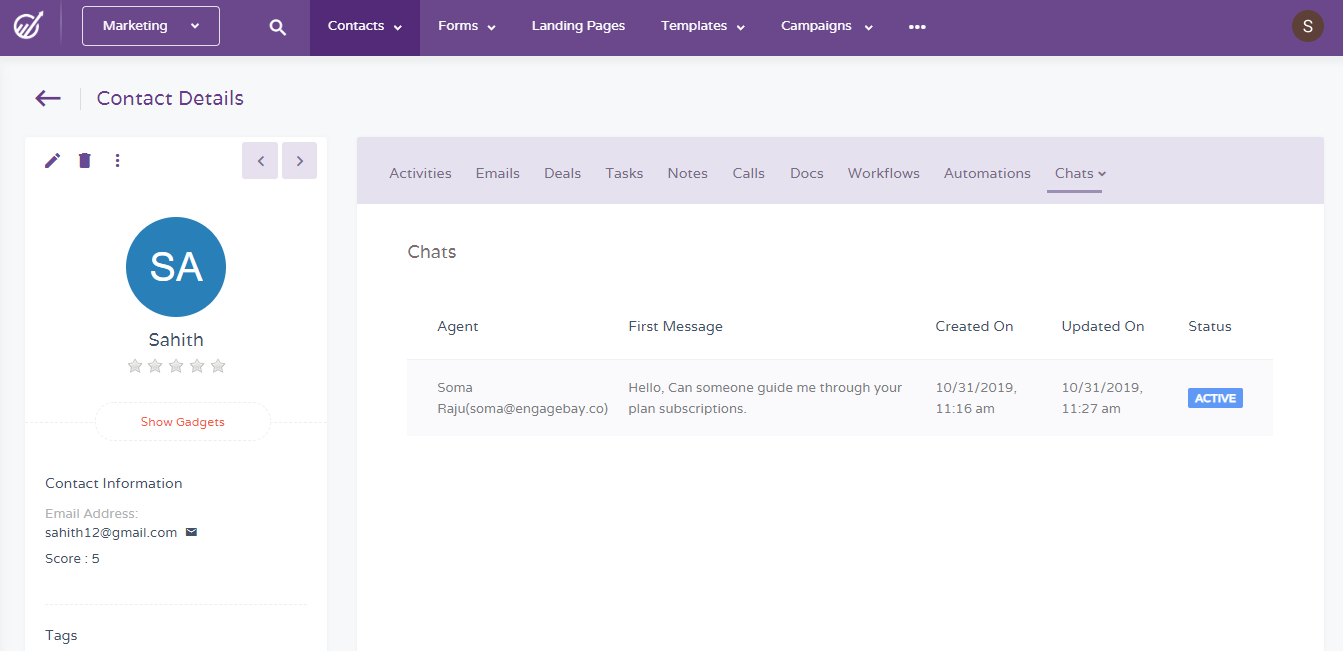
Contact detail 
Login
انسٹال کرݨ
1) Install the EngageBay wp Live chat plugin
Login to your WordPress admin panel, go to the ‘Plugins’ menu and click on ‘Add New’.
-
Search for ‘EngageBay Live chat’ in the WordPress plugin repository and click ‘Install Now’. Activate the plugin after installation. After activation, you will see the ‘EngageBay’ tab on your main menu.
-
Download the EngageBay live chat WordPress plugin from our website. Click ‘Upload Plugin’ to upload the plugin zip file and click ‘Install Now’. Activate the plugin after installation. After activation, you will see the ‘EngageBay’ tab on your main menu.
2) Create or set up EngageBay account
Click on the ‘EngageBay’ tab and navigate to ‘Settings’. Create a new EngageBay account if you don’t have one.
3) Set up chat widget in EngageBay
Follow the instructions and set up chat widget in EngageBay.
ہرہک دے سوال
-
Do I need to have an EngageBay account set up already?
-
No, you can create a new EngageBay account through the plugin or use an existing account if you have one.
-
Who should use EngageBay wordpress live chat plugin?
-
EngageBay live chat wordpress plugin is ideal for smart business owners, bloggers, designers, developers or anyone who wants to engage and capture leads from their website, grow visitor engagement and revenue.
-
Do I need to have coding skills to use EngageBay chat?
-
Not at all! EngageBay chat has been created for everyone without needing any coding skills.
-
Can I use the EngageBay live chat plugin for free?
-
Yes! You can use our wp live chat plugin completely for FREE.
-
My question is not listed.
-
Please visit out our support page for help documentation and access other support channels or simply send us an email to support@engagebay.com.
ریویو


Contributors & Developers
“EngageBay Live Chat – Best live chat plugin for WordPress sites” is open source software. The following people have contributed to this plugin.
حصہ پاوݨ آلے
“EngageBay Live Chat – Best live chat plugin for WordPress sites” دا آپݨی زبان وچ ترجمہ کرو۔
ڈیویلپمنٹ وچ دلچسپی ہے؟
Browse the code, check out the SVN repository, or subscribe to the development log by RSS.
تبدیلی لاگ
Compatibility check with WordPress 6.3