
تفصیل
Social Icons Sticky plugin adds social media sharing icons to a WordPress site. The plugin adds social share icons to posts or pages of your WordPress website and allows visitors to share the content of a post or page on various social media sites. It automatically picks the featured image, post title, and meta description for sharing depending on the social media. You can choose which social icons to enable. It supports multiple icon placement positions. You can place social icons before and after the page/post content. Also, you can place sticky icons on the right or left side of your WordPress site.
Social sharing icons are a crucial aspect of WordPress website design, SEO, and functionality. They allow users to easily share content from your website on their own social media profiles. This can result in increased website traffic, interaction, and, ultimately, brand awareness.
Furthermore, including social sharing icons on your website can help to improve your search engine optimization, visibility, and reach of your website, as well as your online presence and reputation.
Social Icons Sticky Features
- Social Icons Sticky Features
- Social Icons to Page or Post
- Place Icons Before or After Content
- Sticky Social Share Icons
- Popular Social Media Icons
- Customize Social Sharing Icons
- Multiple Icons Placements
- Icons Design Settings
سکرین شاٹاں
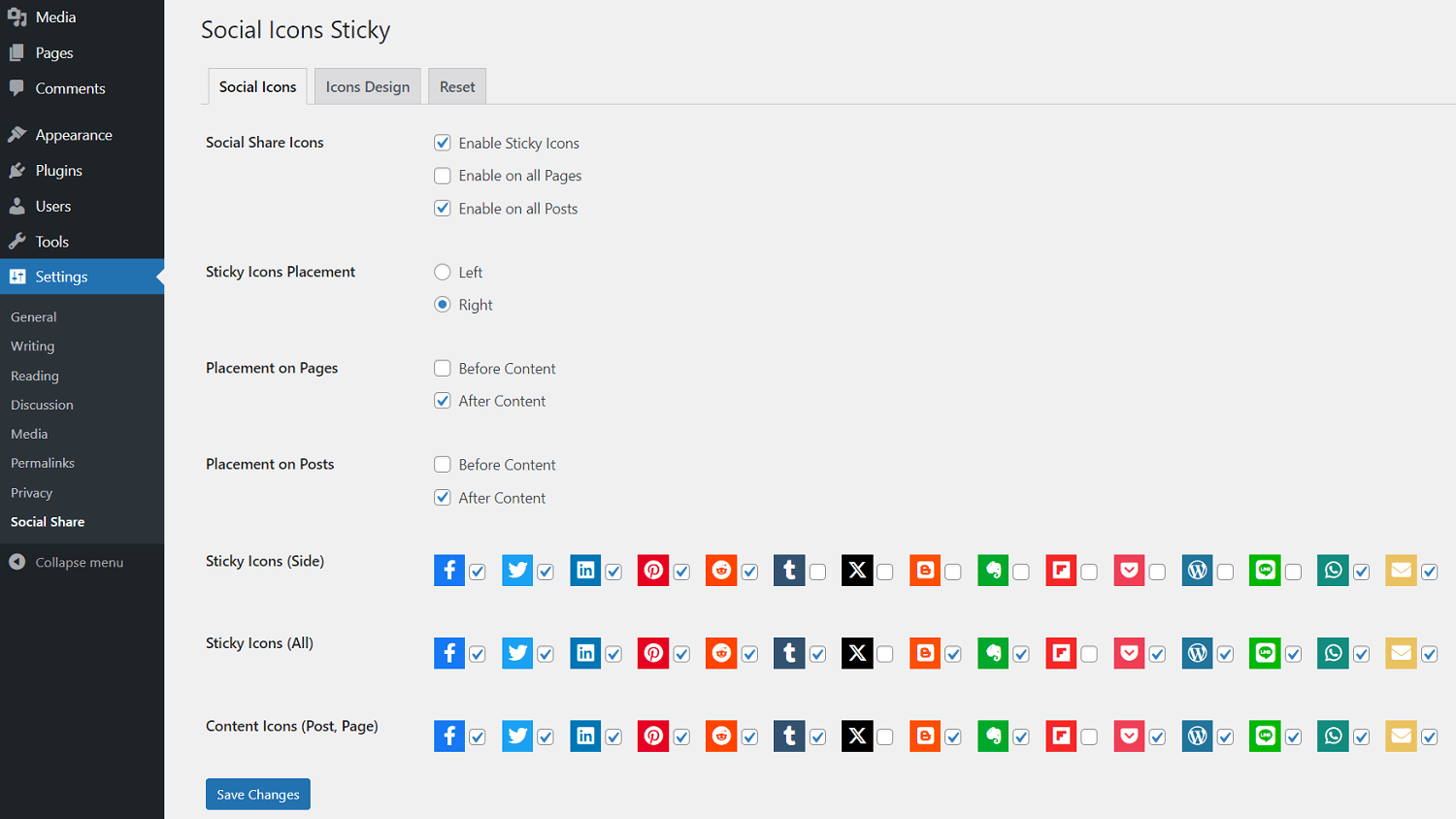
Social Icons Settings 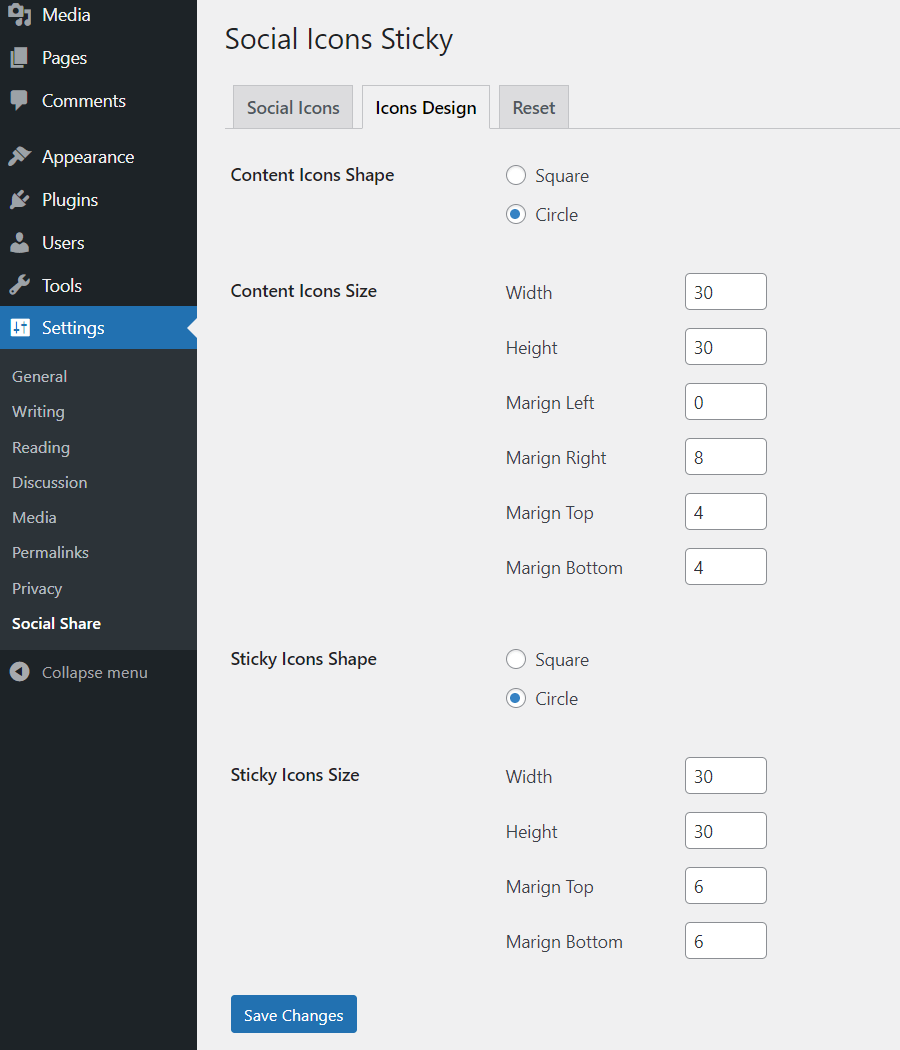
Icons Design Settings
انسٹال کرݨ
Social Icons Sticky [Installation Guide]
- You can:
- Upload the entire
share-social-mediafolder to the/wp-content/plugins/directory via FTP. - Upload the zip file of plugin via Plugins -> Add New -> Upload in your WordPress Admin Panel.
- Search Social Icons Sticky in the search engine available on Plugins -> Add New and press Install Now button.
- Upload the entire
- Activate the plugin through Plugins menu in WordPress Admin Panel.
- Click on Social Share under Settings menu to configure the plugin.
- Ready, now you can use it.
ہرہک دے سوال
-
How to configure icons placement?
-
On your WordPress, go to Settings -> Social Share menu page to configure the placement of icons.
ریویو


Contributors & Developers
“Social Icons Sticky” is open source software. The following people have contributed to this plugin.
حصہ پاوݨ آلے
“Social Icons Sticky” has been translated into 1 locale. Thank you to the translators for their contributions.
“Social Icons Sticky” دا آپݨی زبان وچ ترجمہ کرو۔
ڈیویلپمنٹ وچ دلچسپی ہے؟
Browse the code, check out the SVN repository, or subscribe to the development log by RSS.
تبدیلی لاگ
1.5.7
- Tested up to 6.5.
- Tested compatibility with PHP 8.3.
- Readme updated.
1.5.6
- Updated Font Awesome library to 6.5.1.
1.5.5
- Changed default sticky icons.
- Readme updated.
1.5.4
- Tested up to 6.4.
1.5.3
- Improvement: Icons updated.
1.5.2
- Bug fix: Sticky icons.
1.5.1
- Changed default sticky icons.
1.5.0
- Improvement: Fixed sticky icons overlapping issue.
1.4.8
- Accessibility improvements.
1.4.7
- Improvement: Fixed caching for webfonts.
1.4.6
- New: Added more social share icons.
1.4.5
- Tested up to 6.3.
1.4.4
- Tested up to 6.2.
1.4.3
- Improvement: JS code.
1.4.2
- Improvement: Settings page.
1.4.1
- Readme updated.
- New: Choose icons to show.
- New: Added more social share icons.
1.4.0
- Improvement: Minimized library size.
- Improvement: Code refactor.
- Improvement: Better accessibility.
- Screenshots updated.
- Readme updated.
1.3.7
- Improvement: Settings page.
1.3.6
- Tested up to 6.1.
- Improvement: RTL support.
1.3.5
- Improvement: Settings page.
1.3.4
- Tested up to 6.0.
1.3.3
- Improvement: Load plugin translations using the init action.
1.3.2
- Tested up to 5.9.
1.3.1
- Improvement: Minor fixes.
1.3.0
- Updated Font Awesome library to 5.15.3.
- Improvement: Brand colors update.
1.2.7
- Tested up to 5.8.
1.2.6
- Updated: Plugin screenshots.
1.2.5
- Improvement: Upsell banner clean-up.
1.2.4
- Tested up to 5.7.
1.2.3
- Updated Font Awesome library to 5.15.2.
- Changed default margin values.
- Added minified version of CSS and JS files.
1.2.2
- Plugin settings page UI improvements.
- Improved code.
1.2.1
- Compatibility with PHP 8.
1.2.0
- Updated Font Awesome library to 5.15.1.
- Tested up to 5.6.
1.1.6
- Updated Font Awesome library.
1.1.5
- Added welcome notice on activation.
1.1.4
- Tested up to 5.5.
1.1.3
- Tweaked sticky icons position from the top.
1.1.2
- Improved logic for outputting the social icons.
1.1.1
- Changed default shape, width and height of social icons.
- Updated Font Awesome library.
1.1.0
- Changed action hook used for redirecting to settings.
1.0.9
- Updated readme file.
1.0.8
- Added Plugin URI.
- Updated Font Awesome library.
1.0.7
- Fixed icons alignment issue.
- Tested up to 5.4.
1.0.6
- Code refactor.
1.0.5
- Added icons design settings.
- Tested up to 5.3.
1.0.4
- Fixed sticky modal overlay bug.
1.0.3
- Updated font awesome library.
- Improved sticky icons modal design.
1.0.2
- Removed footer text from icons modal.
1.0.1
- Added new social icon.
1.0.0
- New release.