
تفصیل
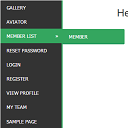
WordPress widget menu for show menu vertically in your site side bar.
Features
- Add vertical menu to your widget area.
انسٹال کرݨ
- Upload the entire
sm-vertical-menufolder to the/wp-content/plugins/directory - Activate the plugin through the ‘Plugins’ menu in WordPress
After activate plugin you will see “SM Vertical Menu” in your widget.
First create a Menu from menu tab.
After creating menu you need to add vertical menu to your sidebar and select the menu and save it.
Usage
- Go to Widget.
- Add SM Vertical Menu to your sidebar.
- Select the menu and save.
ہرہک دے سوال
- Installation Instructions
-
- Upload the entire
sm-vertical-menufolder to the/wp-content/plugins/directory - Activate the plugin through the ‘Plugins’ menu in WordPress
After activate plugin you will see “SM Vertical Menu” in your widget.
First create a Menu from menu tab.
After creating menu you need to add vertical menu to your sidebar and select the menu and save it.
Usage
- Go to Widget.
- Add SM Vertical Menu to your sidebar.
- Select the menu and save.
- Upload the entire
ریویو

جنوری 6, 2024
An excellent menu that helped me produce results for the client.

دسمبر 21, 2018
It doesn't work. Don't spend your time trying!!!

اکتوبر 20, 2016
1 reply
It's a very excellent plugin for vertical menu. But I would like to get option to change color.
Contributors & Developers
“SM Vertical Menu” is open source software. The following people have contributed to this plugin.
حصہ پاوݨ آلے
“SM Vertical Menu” دا آپݨی زبان وچ ترجمہ کرو۔
ڈیویلپمنٹ وچ دلچسپی ہے؟
Browse the code, check out the SVN repository, or subscribe to the development log by RSS.