

تفصیل
WordPress keeps a full copy of a post every time you update it. Over a few years those copies quietly become the largest thing in your database, and nothing in the admin shows you how much of it they are.
Revision Autopilot shows you, then removes them — however you prefer to work.
A screen, when a person is deciding
Under Tools Revision Autopilot you get the total, an estimate of the space it occupies, and a breakdown by parent post type. Delete everything, or one post type at a time. Deletion runs in batches with a progress bar that reports what is left after each one, so a site with tens of thousands of revisions finishes without hitting a PHP time limit.
Every destructive action asks twice, in two different places on screen, and says exactly how many revisions it is about to remove. That confirmation works with JavaScript switched off too.
WP-CLI, when a script is deciding
wp revision-autopilot count
wp revision-autopilot delete --scope=post --limit=100
wp revision-autopilot optimize

--dry-run reports what matches without touching it. `--all` repeats a bounded batch until nothing is left.
Abilities, when something else entirely is deciding
The same operations are published as abilities — named operations with input and output schemas, permission callbacks and behavioural annotations — using the Abilities API introduced in WordPress 6.9. Anything that can discover abilities can find these, understand what they take and return, check whether it is allowed to run them, and read back a structured result.
All three surfaces sit on one set of objects, so they cannot drift apart in what they actually do.
What it exposes
Four abilities, all under the revision-autopilot/ namespace:
count-revisions— how many revisions exist, their estimated content size, and the same broken down by parent post type. Read-only.list-revisions— one page of individual revisions with their parent post and timestamps. Read-only.delete-revisions— deletes one bounded batch for a scope and reports how many remain. Destructive.optimize-tables— runs OPTIMIZE TABLE on the posts and postmeta tables. Destructive.
And three WP-CLI commands over the same code:
wp revision-autopilot count
wp revision-autopilot delete --scope=post --limit=100
wp revision-autopilot optimize
How it stays safe
Deleting revisions cannot be undone, and the same operations are reachable from three directions. Each one has to be safe on its own terms.
- Every ability and every CLI command checks permission itself. Neither path has a form or a nonce behind it, so authorisation is never inherited from the surrounding request. Reading needs
edit_posts; deleting or optimizing needsmanage_options. Both are filterable. - The screen asks twice. A destructive control opens a panel stating how many revisions it will remove, and the confirm button inside repeats that number so it cannot be clicked blind. The two steps sit in different places on screen, and the confirmation is plain HTML — it still works with JavaScript switched off. Either step can be backed out of: the panel carries a Cancel, and a deletion already running carries a Stop.
- Deletion is always bounded. One call never removes more than 1000 revisions however large the scope. The result says how many remain, so both the progress bar and a script loop deliberately rather than firing one unbounded request.
- Only revisions are deleted. Every candidate is checked against
wp_is_post_revision()before removal, and deletion goes throughwp_delete_post_revision()so related metadata is cleaned up with it. Published content is never touched. - Only two tables are ever optimized, from a fixed allowlist: posts and postmeta.
- Refusals explain themselves. A caller without permission gets a
WP_Errorsaying which capability is missing, not a bare false.
Moving here from Takahiro Revision Cleanup
The same author published Takahiro Revision Cleanup, a revision cleanup plugin with a screen under Tools. As of version 1.0.0 this plugin does everything that one did, and Takahiro Revision Cleanup is being retired.
If you are moving across: install this plugin, activate it, then deactivate and delete the old one. Nothing needs exporting — both read the same revisions straight out of wp_posts, so the figures will look the same on the first screen you open.
Two details for anyone who had integrated with the old plugin:
- The
tnrc_security_eventaction still fires, alongside this plugin’s ownrevision_autopilot_event. Existing audit logging keeps working. - The minimum WordPress version here is 5.9, the same as the old plugin’s, so migrating never requires a WordPress upgrade. The abilities register themselves only when the Abilities API is present (WordPress 6.9 and up); on older sites the screen and WP-CLI work exactly the same.
سکرین شاٹاں


wp revision-autopilot count reports the same figures for scripts and cron.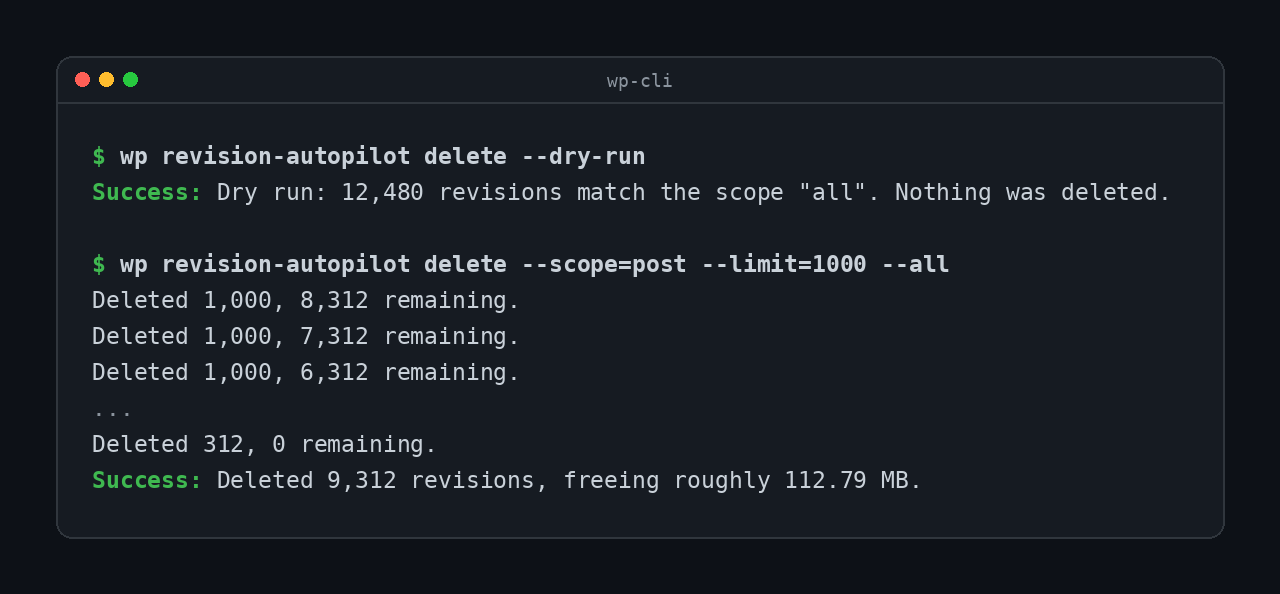
--dry-run reports a scope without touching it, and --all repeats one batch at a time.
wp revision-autopilot optimize runs OPTIMIZE TABLE on the two allowlisted tables, and a second count confirms what is left.انسٹال کرݨ
- Upload the plugin to
/wp-content/plugins/revision-autopilot/, or install it through the plugins screen. - Activate it.
- Open Tools Revision Autopilot. Nothing is deleted until you ask for it.
Scripts and agents need no setup at all: wp revision-autopilot count works immediately, and the abilities register themselves on WordPress 6.9 and up.
ہرہک دے سوال
-
Do I have to use the command line?
-
No. Everything is on the screen under Tools. WP-CLI and the abilities exist for sites where cleanup should happen without a person watching — scheduled scripts, agent-driven maintenance, fleets of sites managed from one place — but nothing requires them.
-
Is deleting revisions reversible?
-
No. Revisions are deleted permanently. Take a backup first, and use
--dry-runorcount-revisionsto see what would go before it goes. -
Why does one call not delete everything?
-
Because an unbounded delete on a large site is a request that runs until something kills it, leaving you with no idea how far it got. Each call removes a bounded batch and tells you how many remain, so the caller stays in control.
wp revision-autopilot delete --allloops for you. -
Deleting revisions did not shrink my database.
-
Deleting rows does not shrink the table file; only OPTIMIZE does. Run
optimize-tablesafter deleting. -
How do I call an ability over REST?
-
Read-only abilities are called with
GET, destructive ones withPOST, against/wp-json/wp-abilities/v1/abilities/<name>/run.The abilities that take no arguments —
count-revisionsandoptimize-tables— still need aninputparameter present, even though it is empty:curl -u user:app-password "https://example.com/wp-json/wp-abilities/v1/abilities/revision-autopilot/count-revisions/run?input="Leaving
inputoff entirely returnsability_invalid_input. The ones that do take arguments are called the usual way, for example?input[per_page]=20. -
Does it work without the Abilities API?
-
The abilities need WordPress 6.9 or newer. On anything from WordPress 5.9 up, the screen and the WP-CLI commands work exactly the same — the abilities simply do not register, and nothing errors.
ریویو
There are no reviews for this plugin.
Contributors & Developers
“Revision Autopilot” is open source software. The following people have contributed to this plugin.
حصہ پاوݨ آلے
“Revision Autopilot” دا آپݨی زبان وچ ترجمہ کرو۔
ڈیویلپمنٹ وچ دلچسپی ہے؟
Browse the code, check out the SVN repository, or subscribe to the development log by RSS.
تبدیلی لاگ
1.0.0
- Added an admin screen under Tools. The total, the estimated size and the one action that uses them sit together; deletion runs in batches and the progress appears where you clicked, not at the top of the page.
- Destructive actions now confirm in two steps that state the count, instead of a browser dialog. The confirmation works with JavaScript switched off, which the dialog never did.
- A confirmation can be cancelled and a running deletion can be stopped. Stopping costs nothing: the revisions already removed are the ones you asked to remove, and running it again continues from there.
- Lowered the minimum WordPress version from 6.9 to 5.9. The abilities already registered conditionally, so nothing was gained by requiring 6.9 — and requiring it would have left sites on older WordPress with nowhere to migrate to.
- Fires
tnrc_security_eventalongsiderevision_autopilot_event, so audit logging written against Takahiro Revision Cleanup keeps working after migrating. - This release absorbs Takahiro Revision Cleanup, which is being retired. See “Moving here from Takahiro Revision Cleanup” above.
0.2.1
- Fixed: count-revisions and optimize-tables could not be called at all. Their input schema declared an empty properties list, which PHP encodes as a JSON array rather than an object, so every call failed input validation.
0.2.0
- Added a Japanese translation, bundled in languages/ as a fallback until language packs exist on translate.wordpress.org.
- Registered the plugin text domain on init, so bundled translations are actually loaded. The Domain Path header alone does not do this.
0.1.0
- Initial release: four abilities and three WP-CLI commands.